


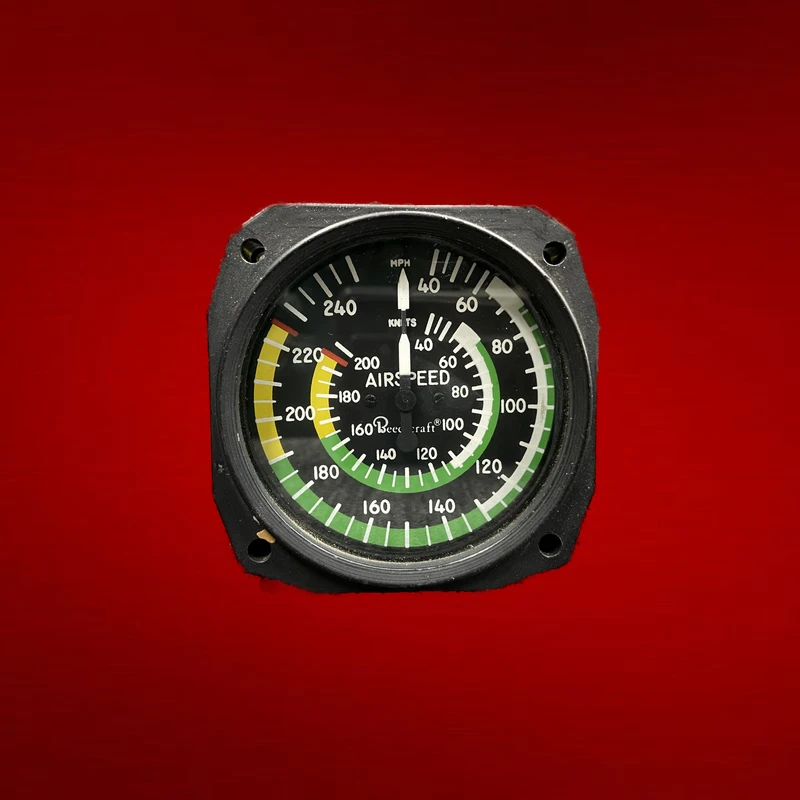
AIRSPEED INDICATOR (P/N ea-5172-1) - As Removed
P/N: ea-5172-1
Category: Flight Instruments
Shipping for this part is quoted to your address. We email you the total to approve before anything is charged.
Available Inventory
| Condition | Price | Stock |
|---|---|---|
| As Removed | $175.00 | 1 Available |
Product Description
The ea-5172-1 is an EDO-AIRE airspeed indicator that displays aircraft velocity by comparing pitot and static pressures in the pitot-static system. This mechanical instrument converts differential air pressure into indicated airspeed readings on a calibrated dial face. Mounted on the instrument panel, it provides essential flight data for pilots during all phases of operation.
The indicator conforms to FAA TSO-C2d performance standards for reliability and accuracy. Installation requires verification against the aircraft's Illustrated Parts Catalog and compliance with maintenance manual procedures, including proper pressure line connections and periodic calibration testing.
Please note: Product descriptions are provided for informational purposes. Always refer to your aircraft's Illustrated Parts Catalog (IPC) to verify part compatibility and specifications.
Frequently Asked Questions
What is the AIRSPEED INDICATOR (P/N ea-5172-1)?
The ea-5172-1 is an EDO-AIRE airspeed indicator that displays aircraft velocity by comparing pitot and static pressures in the pitot-static system. This mechanical instrument converts differential air pressure into indicated airspeed readings on a calibrated dial face.
Is the ea-5172-1 calibrated and ready to install?
Calibration status depends on the condition. Overhauled instruments come fully calibrated with an 8130-3 tag. The AIRSPEED INDICATOR is available in: As Removed. Contact us to confirm calibration status for your selected condition.
Can the ea-5172-1 be used as a direct replacement in my aircraft?
The AIRSPEED INDICATOR is designed as a form-fit-function replacement. Verify the part number against your aircraft's Illustrated Parts Catalog (IPC) and instrument panel layout to confirm compatibility before ordering.
Do you offer instrument exchange programs for the ea-5172-1?
Yes, we offer core exchange programs on select instruments. Send your unserviceable unit and receive a discount on the replacement. Call (904) 998-9101 or submit an RFQ to check exchange availability for the ea-5172-1.
Related Flight Instruments
- COMPASS PANEL – P/N 25-8ws3031-1
- COVER, PITOT – P/N 4935E
- ATTITUDE GYRO – P/N 300-2cfm
- INSTRUMENT – P/N 550-479
- TURN COORDINATOR, STEC-30 – P/N 6405-8-14l
- PITOT – P/N nt2
- MANIFOLD PRESSURE INDICATOR – P/N 58-380106-3
- PITOT TUBE, ELECTRICALLY HEATED – P/N 0851jl1
- STBY AIRSPEED – P/N wl271as5
- TACHOMETER – P/N 821108
- BIAXIAL ACCELEROMETER – P/N 979-00223-001
- VERTICAL GYRO – P/N 2587335-11